Image-based automationDecisions made by reading the screen
Windows · LDPlayer 14 · Clash of Clans automation
A Clash of Clans bot. Queue your villages, automate the grind.
Manage loot raids, resource collection, upgrades and event rewards from one dashboard. Run your villages in sequence with LDPlayer 14 and get new GameBotOps releases through automatic in-app updates.
LICENSED DESKTOP AUTOMATION
License verified
Automatic updatesBackground downloads, in-app install
Rule-driven strategyPriority and threshold rules
Sequential runsControlled rounds on one emulator
Detailed statisticsFleet status at a glance
Event supportChests, card packs and reward choices
In-app updates
GameBotOps stays current. You stay in control.
With the signed installer, new releases are checked, downloaded and verified in the background. Track update status and download progress on the license screen or dashboard.
Automatic checks and downloads
When a new release is available, the package downloads inside the app. Interrupted downloads are retried and can resume when the same package is still available.
Update and restart
Start installation from the panel. The app waits for active work to reach a safe stopping point and confirms emulator shutdown before switching to the new release.
Keep your accounts and settings
Account records, fleet order and preferences are stored separately from application files. Recovery and repair handle interrupted or unsuccessful installations.
Clash of Clans bot features
How does farming, attacking and upgrading get automated in Clash of Clans?
Required game updates are handled through Google Play at startup, and recognised introductory screens are dismissed. We follow events and update the bot at the start of each event to adapt it to the event flow.
GameBotOps reads the visual state of the LDPlayer 14 screen and decides the next safe action for each Clash of Clans profile. Resource collection, eligible building and wall upgrades, visible attack cards and supported event rewards come together in one sequential plan.
Loot and auto attack cycle
Targets meeting loot thresholds are selected; visible troops, heroes, siege machines and spells are used. Village maintenance and supported event rewards follow the battle.
Resource farming, builders and upgrades
Choose Resource only, All upgrades or Walls only. Upgrade modes start a spending cycle when either gold or elixir storage reaches 95%, choosing eligible targets for the available resources and builders.
Multi account and village fleet management
Each account's LDPlayer instance opens in sequence, with only one instance running at a time. Every village is tracked separately; waiting, running and flagged profiles appear in one panel.
Event tracking
The event changes. The bot gets updated.
We follow events and update the bot at the start of each event to adapt it to new screens and event flows.
Chest opening events
Recognises supported chest rewards, opens the chest with four taps and follows the return to the village.
Card packs and reward choices
Opens card packs; three-choice rewards prioritise gold, elixir, dark elixir and event tickets.
Temporary event armies
Tracks visible active event troops and high-quantity cards; spells require verified targets.
Real application screens
Clash of Clans fleet control is no longer guesswork but a visible centre.
Every published view was produced with synthetic aggregate values; none contain a personal account name or device information.
01
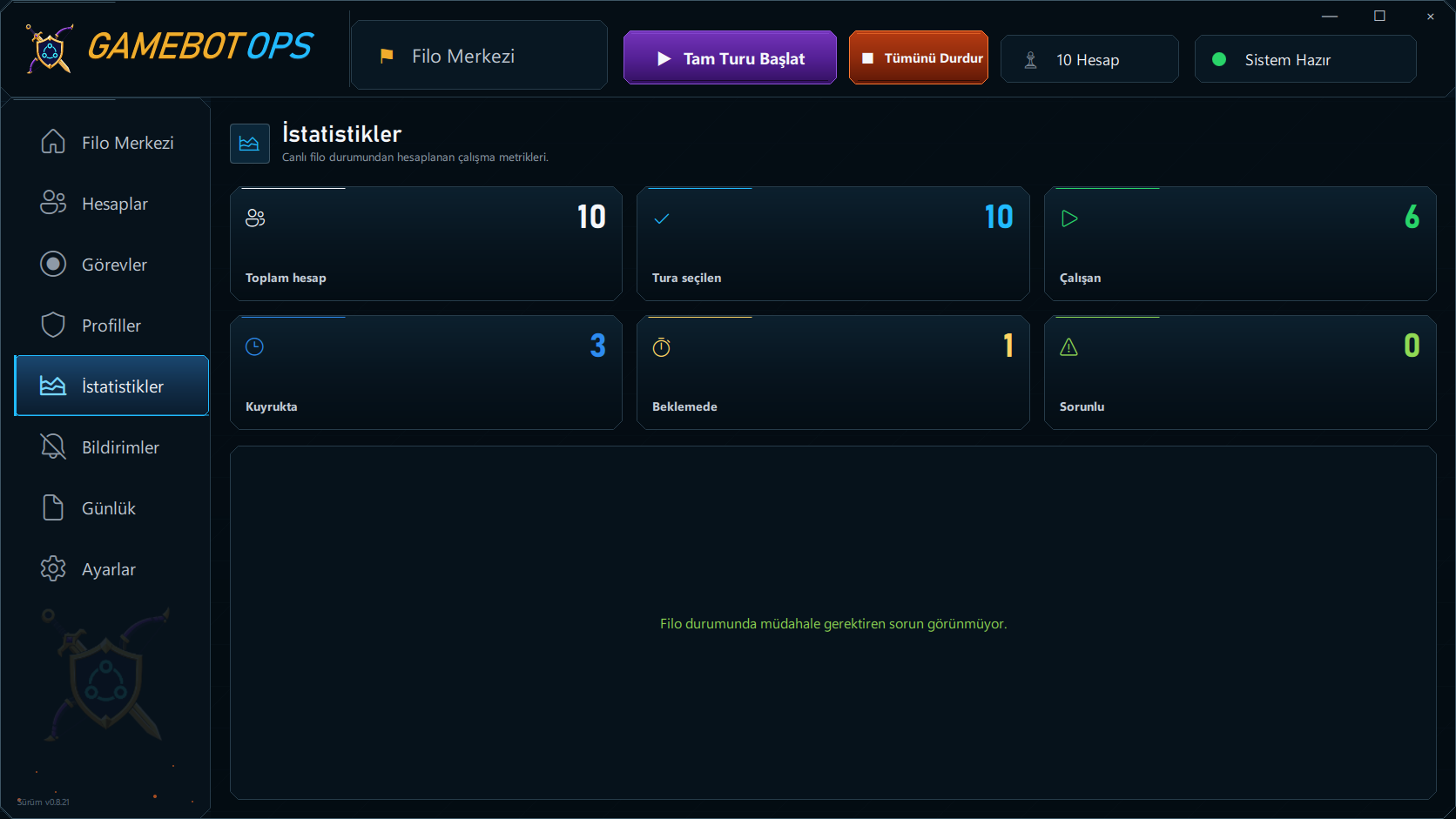
Statistics
Watch the queue at a glance.
Track selected, running and waiting accounts, last verified resource balances and live decisions in one dashboard. Starting, stopping and states requiring attention are clearly shown.
- Per-account session start and finish times
- Persistent resource readings and cooldowns
- Live decisions for each account
02
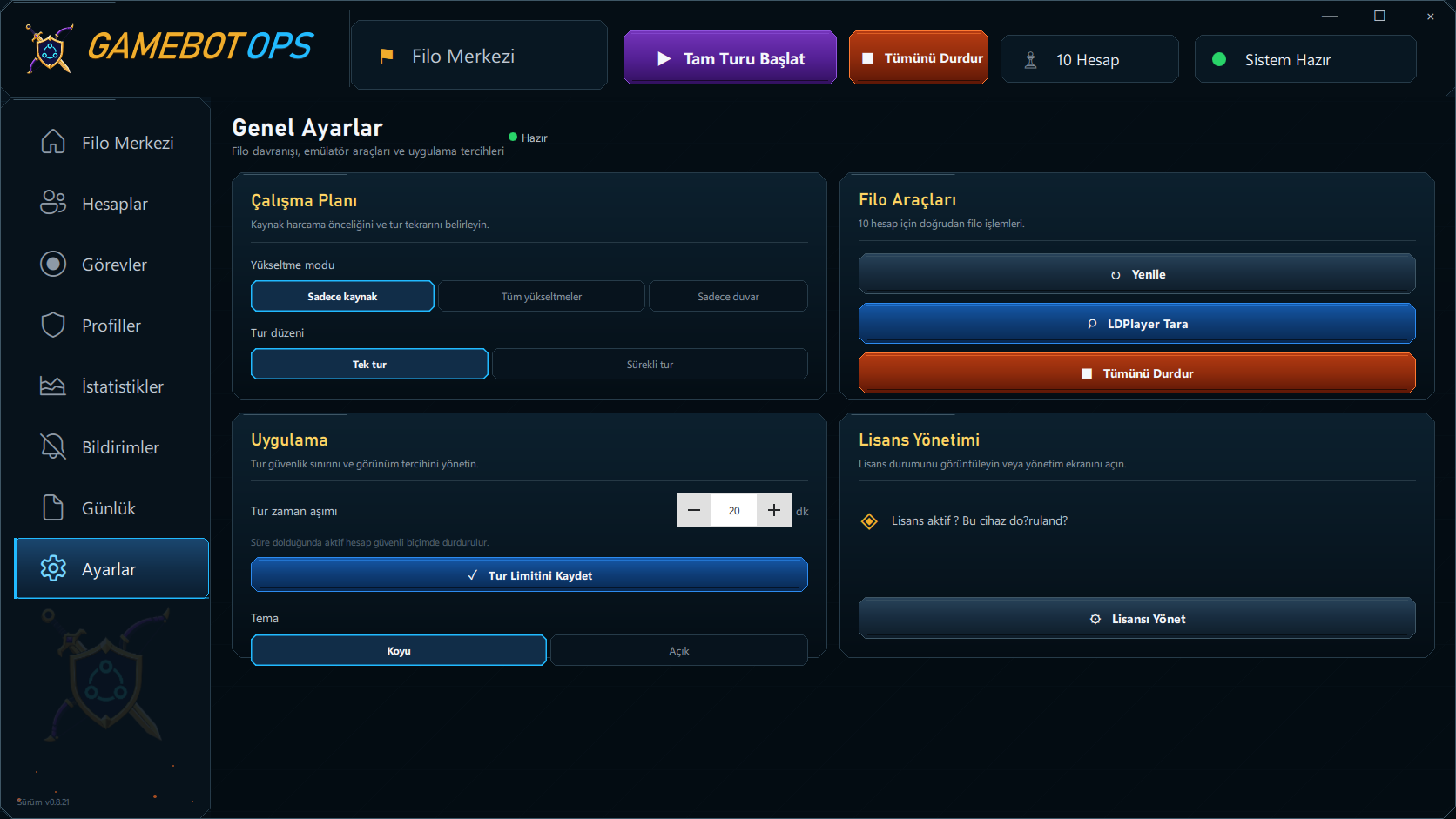
Settings
You define how it runs.
Set resource priority, round order, time limits and theme preference from the same control surface.
- Resource, full or wall mode
- Single round or continuous
- Direct access to fleet tools
03
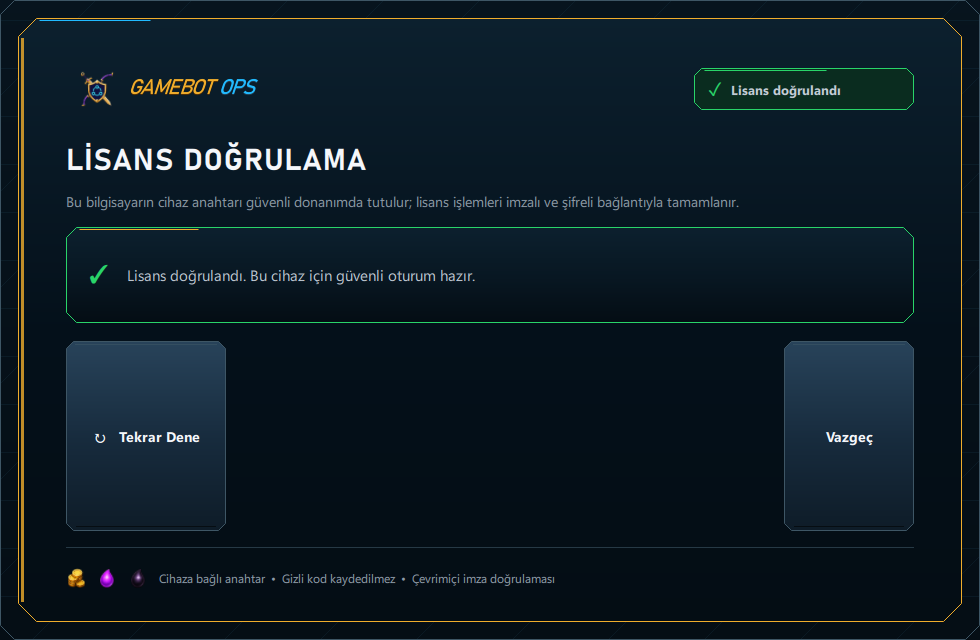
License
Authorisation is verified before the app opens.
The device key and the signed session are verified together before the dashboard loads. The activation code is never written to the client disk.
- TPM 2.0 based device key
- Online verification at startup
- Sensitive input clearing and log masking
License trust
Device-bound, signed and visible.
The license flow is not decoration bolted onto the desktop application; it is a security layer completed before the dashboard opens.
- 01TPM 2.0 device keyNon-exportable key policy inside the Windows secure hardware provider
- 02Signed online sessionServer signature, device and session bindings verified at every start
- 03Protected activation dataThe activation code is never written to disk; sensitive log fields are masked
Verifiable trust
Proof before opinion.
You should not judge a new product on promises alone. How it runs, how the license is secured and how support works are explained through concrete steps you can inspect before deciding.
A product you can see. A license that can be explained. Support you can reach. Decide based on anonymised application screens, a live demonstration and a setup pre-check.
See the multi account flow.
Watch live how profiles are queued, how run states are shown and how accounts needing attention are separated in one panel.
Verify the license design.
Learn how the TPM 2.0 device key, the signed online session and the protection of activation data actually work.
Get hands-on setup support.
We check Windows, TPM 2.0 and emulator compatibility together, and plan the run order around your profile count.
Inspect the application screens
Request a live demo
Verified user experiences will only be published with explicit user consent.
License and setup
Let's plan the setup that fits your fleet.
Tell us your profile count and what you want to achieve, and you get a clear plan for hardware compatibility, calibration and license scope.
Compare monthly plans and prices →
- 01Hardware checkWindows, TPM and emulator compatibility
- 02Calibration planResolution and visual template preparation
- 03License scopeAuthorisation matched to your setup
Short answers
Frequently asked questions
Which game is GameBotOps built for?
Clash of Clans. It automates resource collection, loot raids, eligible building and wall upgrades, event rewards and sequential multi-account management on Windows.
Does the Clash of Clans bot touch the game memory?
No. GameBotOps reads the emulator screen and sends taps or swipes over ADB. It does not read memory, intercept network traffic or patch the application.
Can using a bot get my account banned?
The Clash of Clans terms of service prohibit third-party automation and enforcement is always possible. No bot can promise otherwise; the ban risk page covers this in detail.
How many villages run at once?
The fleet runs sequentially and only one emulator is open at a time. When a profile finishes its round the next one starts.
What does the setup require?
Windows 10 22H2 or Windows 11 (x64), TPM 2.0, local ADB access and LDPlayer 14 configured at 1280 × 720 resolution with DPI 240.
Is an internet connection required for the license?
Online verification runs at application start. Timed licenses are renewed periodically while the application is running.
Are chest openings and other events supported?
Automation covers supported chest openings, card packs, three-choice reward screens and visible temporary event troops. We follow events and update the bot at the start of each event to adapt it to the event flow.
Are all upgrades automated?
All upgrades mode covers eligible normal-builder buildings and walls. Town Hall, heroes, laboratory research, Goblin assistance, Gem spending and wall rings are excluded.
Does GameBotOps update automatically?
The signed installation checks, downloads and verifies new releases in the background. Once the package is ready, choose Update and restart to begin installation. Active work must reach a safe stopping point before the app reopens with the new release.
Will an update erase my accounts and settings?
Account records, fleet order, working preferences and last resource readings are stored separately from application files and preserved during updates. Remaining fleet work can resume when the license and restart conditions are valid.
Plain risk notice
Using automation carries a risk of account enforcement.
GameBotOps is independent third-party desktop automation; it is not endorsed by or affiliated with Supercell. The Clash of Clans terms of service prohibit third-party automation, and the decision to use it rests with the user.